To help with building your Sculpt command, I would recommend selecting the Create Input File and Do not run Sculpt options in the GUI:
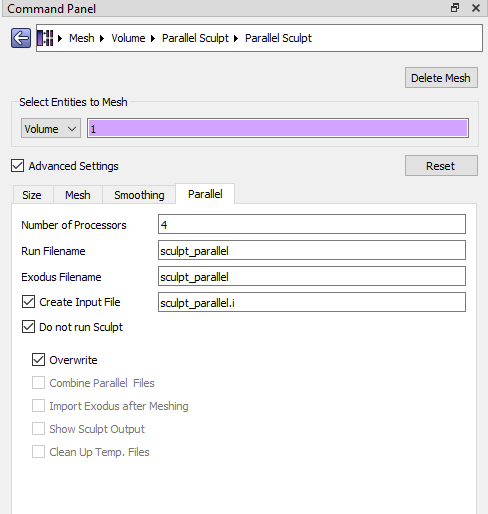
and then open the sculpt_parallel.i file that is generated – and then add the capture command:
$ Input file created: Mon Mar  1 07:54:43 2021

BEGIN SCULPT

  nelx = 197
  nely = 121
  nelz = 96
  xmin = -13.274500
  ymin = -15.125500
  zmin = -23.349500
  xmax = 35.975500
  ymax = 15.124500
  zmax = 0.650500
  laplacian_iters = 5
  pillow = 1
  exodus_file = sculpt_parallel.diatom_result
  diatom_file = sculpt_parallel.diatom
  capture = 4   <----- ADD THIS LINE (delete this comment)

END SCULPT
Then you’ll simply run sculpt with the following structure:
## Serial Execution
& 'C:\Program Files\Coreform Cubit 2020.2\bin\sculpt.exe' -i .\sculpt_parallel.i

## Parallel Execution
& 'C:\Program Files\Coreform Cubit 2020.2\bin\sculpt.exe' -j <Num Processors> -i .\sculpt_parallel.i
This will output an Exodus file (*.e) that you can load into Cubit.