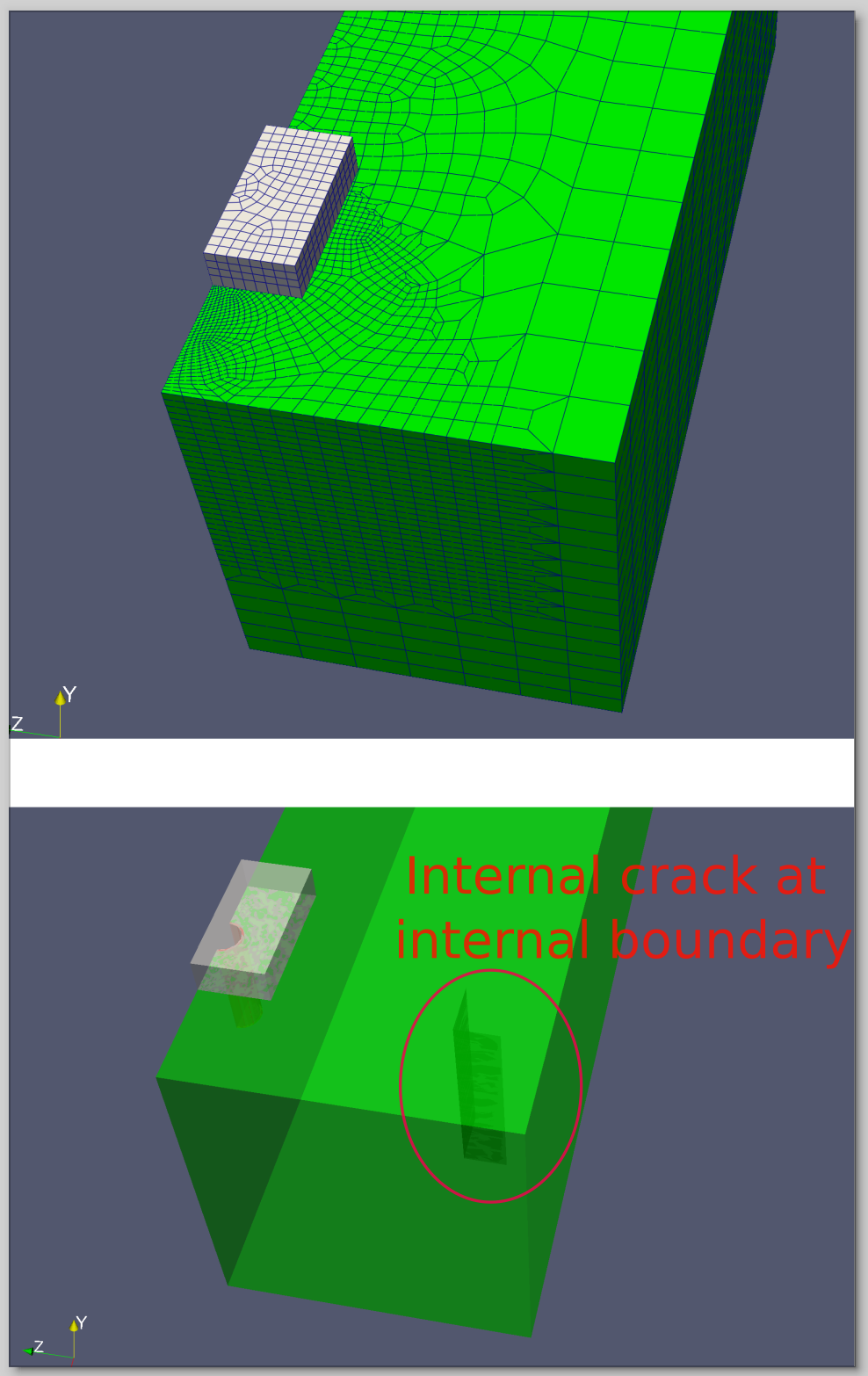
EDIT: See second post for a smaller example to demonstrate the issue.
Cubit’s refine hex ... command is an outstanding feature for our research, as it allows us to perform local mesh refinement in areas where we expect strong localization of deformations. Such areas are not necessarily associated with particular geometric features, and hence, local seeding or using extended webcuts are inferior options.
However, I have observed that the refinement algorithm runs into problems when the refinement region crosses internal boundaries of a body. In such cases, the refinement is executed, but the mesh becomes disconnected internally.
Is there any way to resolve this problem?
I have attached a script that generates a model exhibiting this issue, which can also be seen in the screenshot.
As mentioned, the refinement is done properly, but internally the mesh exhibits “cracks,” and the following error log occurs:
ERROR: generate_edge_breakout.py, line 232. Inconsistent edge to face count relationship.
       ERROR: generate_edge_breakout.py, line 232. Mesh of Surface 40 is invalid.
ERROR: generate_edge_breakout.py, line 232. Refinement process resulted in an invalid surface mesh.
ERROR: generate_edge_breakout.py, line 232. Unable to refine the given list of hexes.
ERROR: generate_edge_breakout.py, line 232. Unable to complete refinement operation on mesh.